
Reviewed: CoPilot Live Premium HD Europe

1
Posted September 29, 2012 by Jane Jones in
copilot

Rating

Ease of use


Price


Total Score


Positive:

Not only is it a great sat-nav it also has some great features for places around you. Retina ready and easy to operate.
 

Negative:

None.
 

CoPilot Live Premium Europe by ALK Technologies turns your iPhone or iPad into an in-car sat-nav. There are many navigation apps available for your phone and some that are even cheaper than CoPilot, but this one stands out above the rest due to its many features and maps. Setting up the app is very simple. [...]

by Jane Jones
Full Article

CoPilot Live Premium Europe by ALK Technologies turns your iPhone or iPad into an in-car sat-nav. There are many navigation apps available for your phone and some that are even cheaper than CoPilot, but this one stands out above the rest due to its many features and maps.

Setting up the app is very simple. Before you start your journey first you need to choose the maps you wish to download. This needs to be done over wifi and you will need to make sure you have enough memory on your device. The maps are then stored for any offline navigation once downloaded. Great if you suddenly lose a connection, you still have the reassurance that the maps are to hand.

When you are then ready to use CoPilot you enter your destination. Just type in the postcode and it will start searching for you as you type. On occasions I didn’t even need to finish typing it, it found it very quickly. You can navigate to the postcode, house number or even from a photo if it has the location. When you have entered all the details you are good to go.

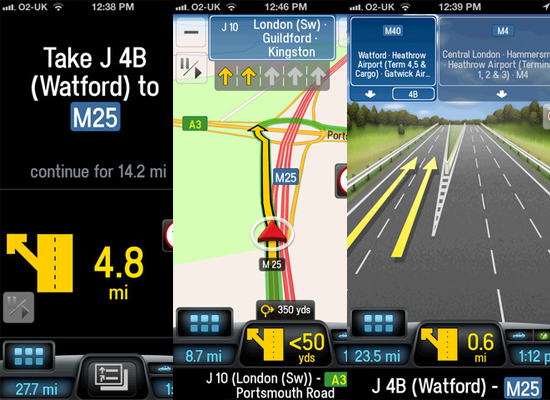
The route shown is one of three and you can decide which one you would rather take. As soon as you start the app like any normal sat-nav it will then start giving you the directions on screen and voice instructions. The voice instructions were very clear and at the correct timing when approaching junctions and lanes. It also repeats the instructions to keep you informed of where you are going. You have the usual view of 2D or 3D maps or you can just have the directions on screen, which ever suits you best.

The maps view is very good. It was clear and perfect if you struggle in busy areas with several lanes. It shows the direction with easy lane arrows and makes it very simple to follow. You can set it up to alert you of speed cameras and speed limit warnings. If you are driving a larger vehicle you can also use the RV routes to get to your destination

CoPilot Live Premium comes with lifetime use and also 12 months free ActiveTraffic. With this you can find the fastest route and automatically find a new one when needed at busy traffic times and there is also colour coded live traffic.

Not only is it a great sat-nav it also has some great features for places around you. Under the Places Of Interest section you can find Hotels, Restaurants and Petrol stations. You can also do a local search within the app using Google or Wikipedia Search. There is so much more you can do to save you having to go out of the app and then back in. The weather section will give you a 5 day forecast and there is even an in-app music player. If checking-in to places is your thing, then you can do that too with Facebook Check In.

The app just had a new update and is now iPhone 5 ready with retina graphics. You can also use Apple Maps integration. Apple maps now give you the ability to launch other apps for directions and this has been implemented into CoPilot live. It is really easy to set up. Once you have opened Apple Maps, enter destination, select bus, press route, CoPilot will appear in the list, tap the button next to it and that is it! All super easy to plan.

I found the app very easy to set up and use and the maps always got my directions correct. It even told me on one of my routes that the house I was going to was restricted for some vehicles. CoPilot is one of the most useful navigation apps you will find for your iOS device and with the maps to view offline, a worthwhile app to purchase.


About the Author

Jane Jones

Huge iPhone/iPad fan. App addict. Love taking photos. Also on Instagram (iPhoneQueen) Happy with iPhone in one hand & cake in the other.

1 comments
phone services
phone services

The feature which shows you the different alternate routes that you can take is very useful especially if you want to save gas.