Synology DiskStation DS411slim NAS review
Positive:
With support for media server, backup, VPN server hosting and much more I can't recommend the DS411slim highly enough for both small business and home users.Negative:
Cost of 2.5 HDD is quite high but worth it.With support for media server, backup, VPN server hosting and much more I can’t recommend the DS411slim highly enough for both small business and home users.
Synology DiskStation DS411slim is designed to provide users with a compact yet feature laden solution for easy file sharing and backup. Snap-in 2.5”hard drives design brings low power consumption, quiet operation, reliability and easy disk replacement in a compact size. The operating system, Synology DiskStation Manager, delivers rich features for multimedia enjoyments, Internet sharing, worry-free data protection and energy-saving options.
[flagallery gid=25 name="Synology DS411Slim"]
- Small Footprint
- Flexible RAID Data Protection
- Cross Platform File Sharing & Backup
- DLNA Certified Media Server
- Cool and Quiet
- Power-Saving (9W~16W)
What’s in the box
- Main Unit X 1
- Installation Disc X 1
- Welcome Note X 1
- Assembling Kit X 1
- AC Power Adapter X 1
- AC Power Cord X 1
- RJ-45 LAN Cable X 1
Backing up our important archives of documents, photos, music and videos is something that some people will overlook; with the cost of laptops and desktop computers most people tend to think they would last forever or never fail until their hard drive fails. When hard disk storage fails the best thing you can hope for is having backup copies of those files you might have lost in the process or when Windows based PC fails and you need to restore back to factory settings having backup copy of your system would be heaven sent.
With the likes of Dropbox and other cloud backup solutions you would think a physical NAS device would be a thing of the past but that’s far from the reality of the fact that not everyone can afford big cloud storage space for their files. I struggle to find a NAS device that will allow efficient and reliable file transfer, backup and synchronize without affecting my daily tasks. I have used the likes of netgear and other brands and having heard about synology, it was about time I try something different.
Hardware and Design
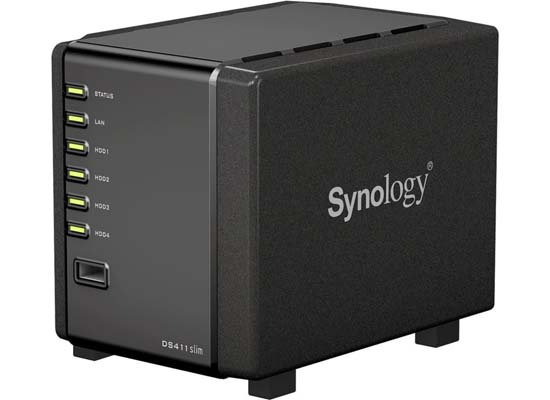
Initial thought was the slim design of the DS411slim, it came in an eye pleasing packaging and opening it up was definitely no suprises or any disappointment. It has gone beyond your typical 3.5 NAS devices on the market to a device that will house your 2.5 laptop hard drive. The 120 x 105 x 142 mm device only weighs about 660g; The chassis made of black plastic comes packed with a 1.6GHz processor and 256MB of DDR3 RAM. The DS411 will hold four 2.5-inch HDD which means you could easily have maximum of 4 huge terabytes of storage and backup system in place. Looking at the front is a USB 2.0 port with a dedicated copy button to instantly backup a USB drive and an eSATA port to add storage or share USB printers across your network. To support your Network, you get a single gigabit ethernet port for Network sharing and backup.
Although the 2.5 HDD are more expensive per gigabyte than 3.5-inch drives, they offer better reliability, safety and durability because as you can imagine when you have them in your laptop they easily withstand vibrations and little knocks when on the move; the same thought goes in to the fact that they support the 2.5 HDD rather than your typical 3.5.
The 2.5 inch also proves to be cooler and quieter when in use but the DS411slim also comes with a quiet 60mm fan for added coolant for the hard drives. One thing I also noticed was the way Synology makes it so easy to add and remove your hard drives without the need for any screws. The minimalist design is definitely a winner for anywhere you have it situated.
Software
I have used various NAS devices before and I have been accustomed to the basic linux looking interfaces that comes with them usually needing some time to get used to but the DS411slim DiskStation Manager 3.2 software is as good looking and simple as the NAS itself. Synology has opted to offer an OSX looking interface with draggable, multitasking capabilities and to make organisation even better, there’s support for multiple user accounts and can be configured to usage limits, it supports site and mail server hosting, DLNA/UPnP media streaming to your PS3, Xbox 360, computer or PMP, standalone downloads, printer sharing for up to two printers and FTP support. The FTP support is something I found extremely useful as GadgetsBoy website alone houses huge amount of files and became a very useful part of backing up the website on daily basis.
Spending few hours with it, you can get a little more technical and configure your own VPN (Virtual Private Network) server, or iTunes media server. The DS411slim is so simple yet so sophisticated that it would also supports Mobile apps for iOS and Android for remote control, data access, network printing and if you have a compatible IP camera you can configure your own remote surveillance via a web browser. I currently I have the Edimax Dual Mode IP Camera and they are just a match made in heaven.
Although the DSM 3.2 supports regular RAID, Synology’s own Hybrid RAID system can create a redundant array across multiple drives which mean disks can be dynamically swapped out for larger volumes, so if you start out with 2 disks, you can simply add more without powering down the device because when the new drive is inserted, the array is rebuilt automatically. Synology’s own Hybrid RAID system is highly efficient but it also supports standard options like JBOD, RAID 0, RAID 1, RAID 5, RAID 5 Spare, RAID 6 and RAID 10.
Usability and Performance
Setting up the DS411slim is very straight forward and if you ever get stuck during installation, the manual is also very helpful with excellent online support from Synology. Most users would have bought the NAS device for backups and if you are a MAC user, you can configure an incremental backup to execute automatically whilst windows users get a copy of Synology Data Replicator 3 on the bundled DVD.
To test the performance and speed, I installed 2 x 1TB Samsung Spinpoint 5,400rpm hard-drive and used the default Hybrid RAID array. One of the drives for back up and one for fail over purposes. When swapping drives make sure you power down before commencing. The slim transfer speeds were impressive, averaging read and write times of 45 MB per second and 45.1MB per second when transferring large files over my Ethernet connection which is Virgin Media’s 50MB fiber optic broadband.
Verdict
Unless you have a thing for large NAS devices and 3.5 HDD then you will see that the DS411slim is perfect in many ways; it is very staright forward to setup and configure, slim, light and quite even when under a lot of heavy use. The Slim drives has no screw and 2.5 HDD may cost more to buy but they offer far better reliability and durability due to their ability to withstand vibrations. The DS411slim also supports regular RAID for those that do not want to change thier ways, and that is a a big bonus for choice of configuration. With support for media server, backup, VPN server hosting and much more I can’t recommend the DS411slim highly enough for both small business and home users.
Where to buy
You can pick up the Synology DS411 Slim 4 Bay DiskStation No HDD from Amazon from about £219.99 in the UK.


google…
Google http://news.google.com…