
It’s finally here, folks—after years of requests from users, Spotify recently announced that it was rolling out its lossless audio feature to Premium subscribers in select markets. Spotify says that the new feature gives users the chance to enjoy the highest music audio quality on the platform, with support for playback of up to 24-bit/44.1 kHz FLAC for a richer, more detailed listening experience.
CHECK OUT: The Bose SoundLink Home is the Perfect Addition to your Smart Home Setup
With that in mind, Spotify’s new lossless audio upgrade will arrive for more than 50 markets through October, and Premium subscribers in Australia, Austria, Czechia, Denmark, Germany, Japan, New Zealand, the Netherlands, Portugal, Sweden, the US, and the UK have already begun to get access. Gustav Gyllenhammar, VP Subscriptions at Spotify comments:
“The wait is finally over; we’re so excited lossless sound is rolling out to Premium subscribers… We’ve taken time to build this feature in a way that prioritizes quality, ease of use, and clarity at every step, so you always know what’s happening under the hood. With Lossless, our premium users will now have an even better listening experience.”
Gustav Gyllenhammar
Spotify says that Lossless audio is the latest in a series of new features designed to enhance the Spotify Premium experience, alongside other features like DJ, Jam, and AI Playlist. The company adds that the new higher-quality audio option will allow for an overall better listening experience. Users also get full control over their listening experience with custom settings for Wi-Fi, cellular, and downloads; in addition to the existing quality options (Low, Normal, High, and Very High), users will see the new Lossless option with a clear display of the data required for each setting.
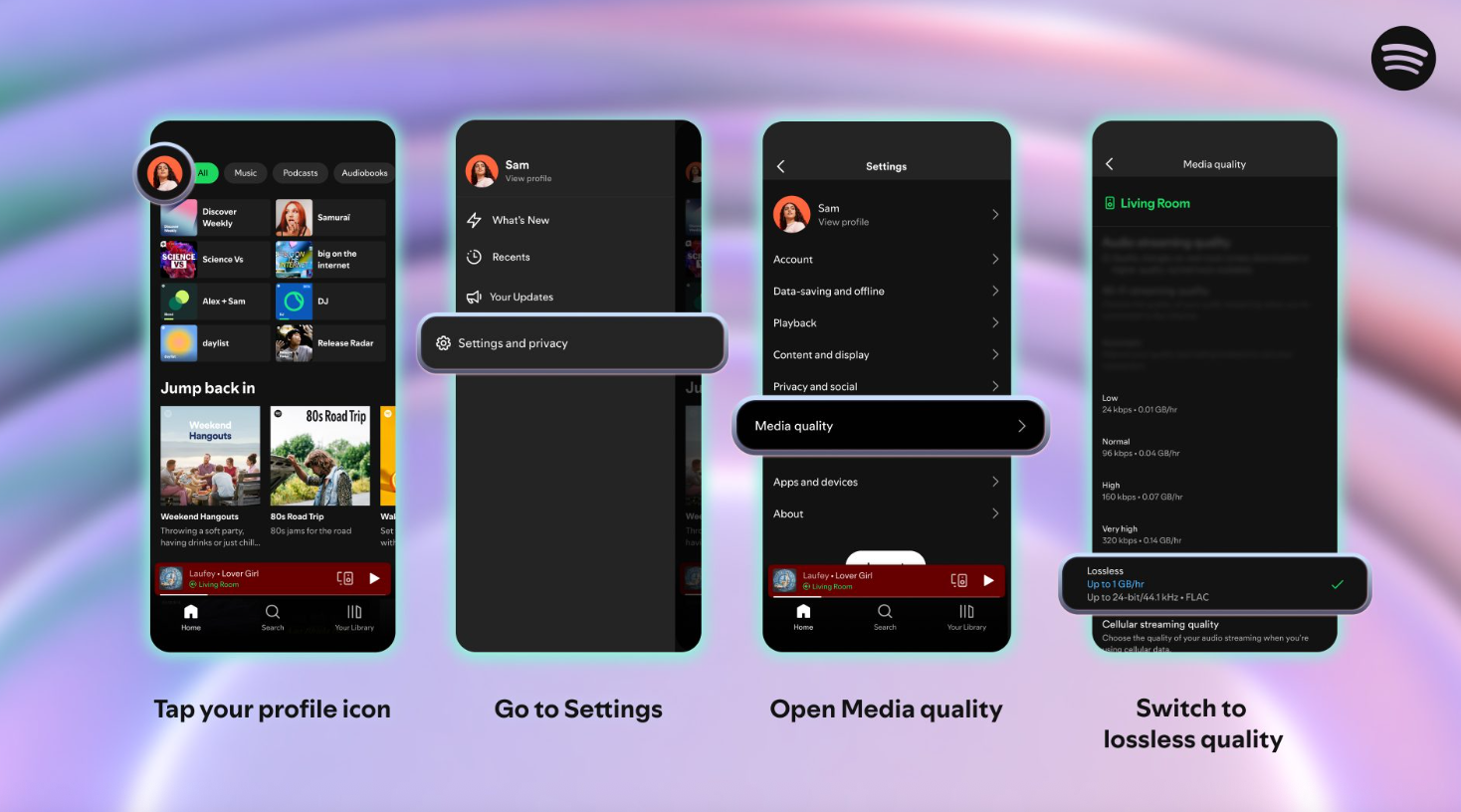
As such, the feature is currently available on mobile, desktop, and tablet devices, with further support for more devices planned for next month. To enable lossless audio, users must manually select it in their app settings:
- Tap your profile icon in the top left.
- Go to Settings & Privacy → Media Quality.
- Select where you want to enable lossless audio: Wi-Fi, cellular, or downloads.
CHECK OUT: Spotify Adds a Built-in Messaging Feature
Once enabled, a Lossless indicator will appear in the “Now Playing” view or bar. Spotify does recommend using a wired connection or Spotify Connect instead of Bluetooth due to the way the latter handles signal compression. For larger file sizes, there may be a slight delay when a track first starts playing, but it will be smooth once the song is cached and loaded.