
Spotify recently announced that it’s bringing over some pretty major changes to the playlist experience for its Premium users. The platform is now offering a new beta feature that allows listeners to add and customize the transitions between songs, allowing for a bit more creative control than usual. The new tool lets users seamlessly blend tracks, fine-tune how they flow together, and even enhance their mix with features like volume, EQ, and effect curves.
CHECK OUT: Samsung’s New Galaxy Buds3 FE Arrive in September
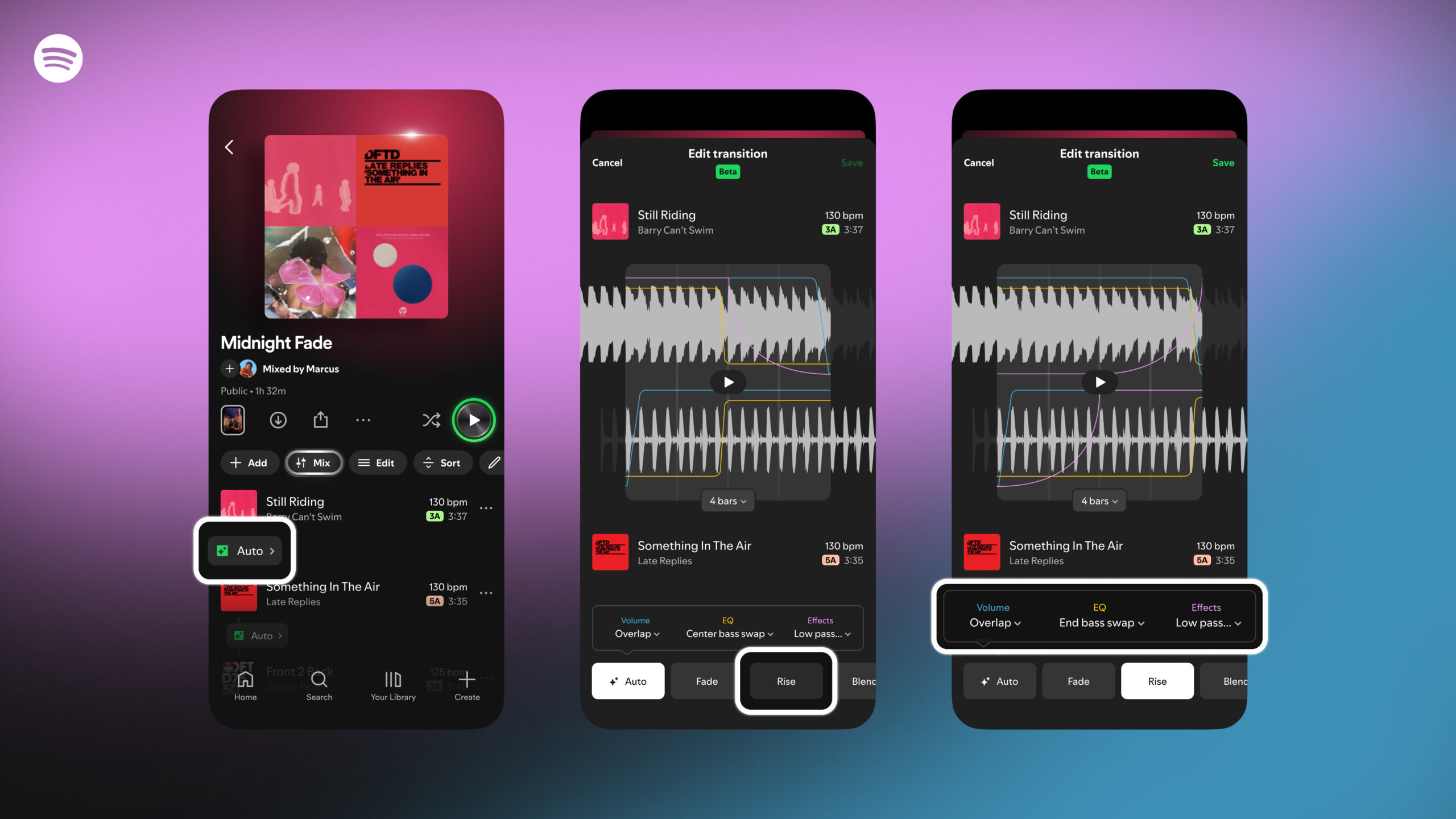
Follow these steps to start mixing your own playlists:
- Open an existing playlist or create a new one.
- Select “Mix” from the toolbar. Your playlist will change to a new view.
- Choose “Auto” for an instant blend, or tap to customize and create a unique transition that fits your style.
- When customizing, use presets like “Fade” or “Rise” to easily apply different transition styles.
- Get more specific by experimenting with settings for volume, EQ, and effects. The waveform and beat data will help you find the best spot in each track for your transition.
- Once you’re done, you can tap on “Save” to keep your playlist; you can also share it or collaborate on a mixed playlist with other Premium users.
- You can also toggle the mix on and off at any time by pressing the “Mix” button.
New to audio mixing? These simple tips will help you create a polished playlist that sounds like it was made by a pro:
- Match Tempos and Keys: For the smoothest transitions, choose songs with similar tempos (BPM) and Camelot keys. The mixing tool automatically shows this data for each track, so you can easily reorder songs for a better flow.
- Pick Transition-Friendly Genres: Some music is easier to mix than others. Genres like house and techno are often produced with seamless transitions in mind, making them great starting points for mixing.
- Consider the Energy: Think about the mood you want to create. Plan your song order to gradually build or wind down the energy, taking listeners on an emotional journey.
- Enhance Your Best Playlists: This feature is perfect for moments when you want to avoid awkward pauses. Upgrade your running playlist with consistent BPMs to set your pace, or curate the perfect party playlist to keep the vibe going all night.
- Visualize Your Mix: Make your playlist even more unique by creating your own cover art with new stickers and labels, which are available exclusively for mixed playlists.